Character with animations
2 minutes read
Import and material setup
- Click and drag the .fbx into Blender.
- If you put the textures in a separate folder, click on
File > External data > Find missing filesand choose your texture folder. - In the 3D viewport, go to the Tark to Blend panel. Leave Clean scene disabled as it’s mostly a tool for importing maps. Click on the folder icon and choose your texture folder. Then, click
Start processto complete the character’s material setup. - Save the file.
Using animations
- Open the
Animationtab. - Open the
Non-linear Animationtool in the top left corner. - Open the
Dope sheet > Action editortool in the bottom section.
View a single animation
- Select the character rig.
- Click on the
Actionicon and select an animation, in the image below it’s Prapor with the Prapor_WhatTheFuck_003 action. - Press Spacebar to play the animation.
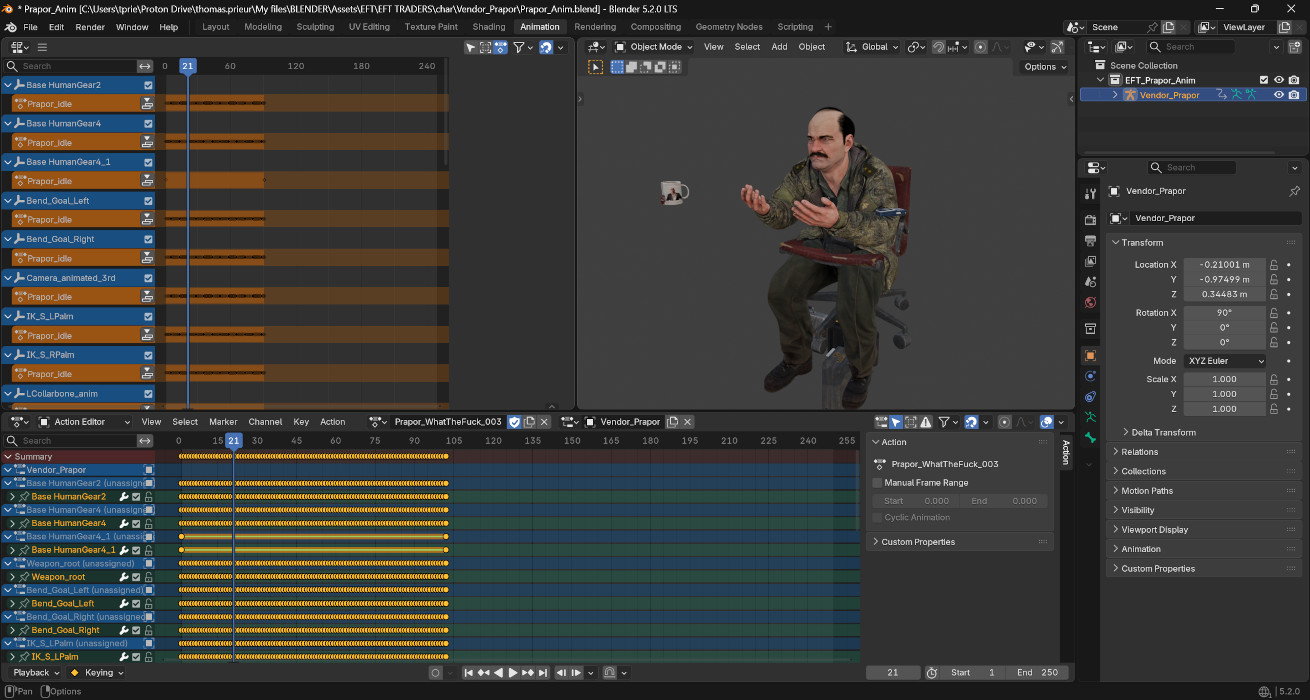
There is also animation data for other objects in the scene (cases, quest items) but I have not tried to use them yet.
Combining animations
Here is how you can create more complex animations with the Non-linear animation (NLA) tool. It allows to mix and layer animations on top of each other, a bit like video editing tracks, making it easier to smoothly transition between animations. To learn more, you can watch Woodplanck’s tutorial.
- Select the character rig.
- Open a first action in the
Dope sheet > Action editor. - Find the rig in the
NLAwindow. Click thePush down actionbutton to add the animation to the track. - Repeat the last two steps to add other animations to the track.
- In the
NLAwindow, arrange the animations to create another complex animation. In the example below, I use three animations. The middle one has theAuto Blend In/Outoption enabled to create a smooth transition.
Unfortunately, I have not found a way to use this technique with the Rigify rig we will create in the next section. For now, in-game animation and custom animations must be used separately.