Algorithm
4 minutes read
In this section I’ll try to explain the algorithm behind the Tark to Blend add-on.
Objective
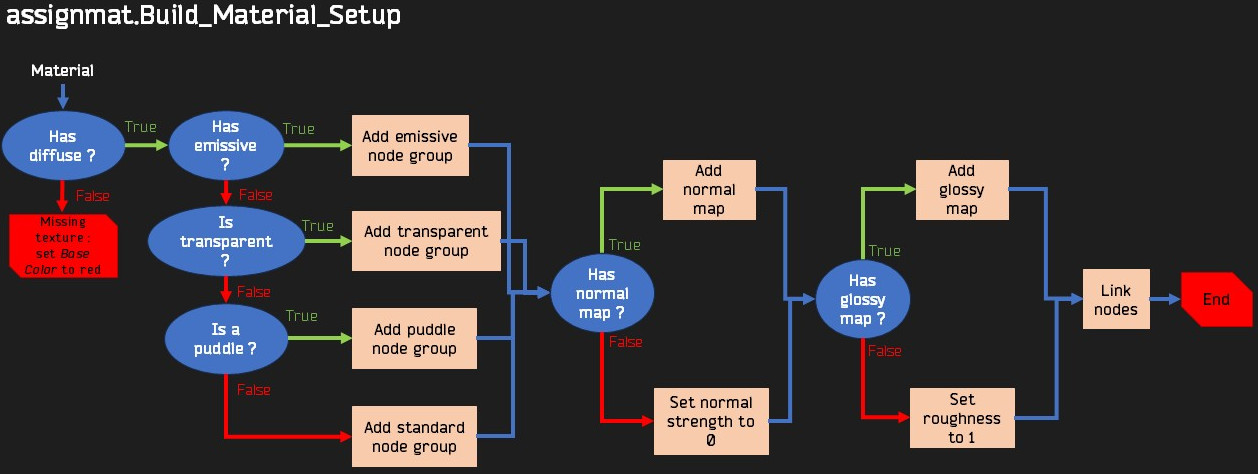
For each imported material, the script must be capable to :
- Detect the content of the node tree ;
- Detect if the material is opaque, transparent, emissive or a puddle ;
- Find the texture(s) required to complete the material setup ;
- Load the textures, the nodes and link them to form a functional material.
Structure
The add-on contains several Python files :
__init__.pyis the main file which is loaded by Blender. It contains the UI instructions and calls the other files to execute its code.assignmat.pycontains the functions used to detect the type of material, load the missing textures, and complete the material setup.cleanup.pyscales the scene, and optionally deletes the empty objects.nodes.pycontains functions that define the custom node groups used in the material setup. This was made with the Node to Python add-on.tardata.pycontains data necessary for the functioning of the add-on, this will be detailed later. (The add-on was originally a single script, so I formatted this data as Python lists. But it could be any form of text file.)
Important functions
Finding if the material is transparent
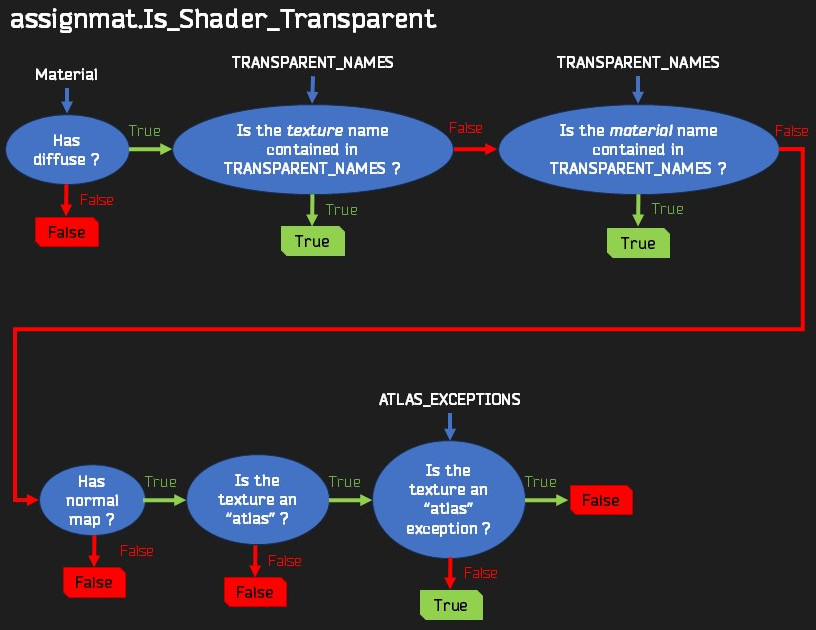
Unfortunately, there is no reliable way to guess if a material is transparent or not, as the textures are the same between the transparent and opaque shaders except for the alpha channel.
My method is to search for keywords contained in the TRANSPARENT_NAMES list in tarkdata.py, based on manual observations. These keywords must appear in the diffuse texture name or in the material name.
=
You will notice that “glass” is not a keyword, even though it would be reasonable to think it should be. Some “glass” materials aere actually not transparent, which means it cannot be used this way.
Another way to find if a texture is transparent is to detect if it’s an “atlas”. An atlas is a texture containing different objects, for example several types of plants. In fact, many vegetal objects have an “atlas” texture.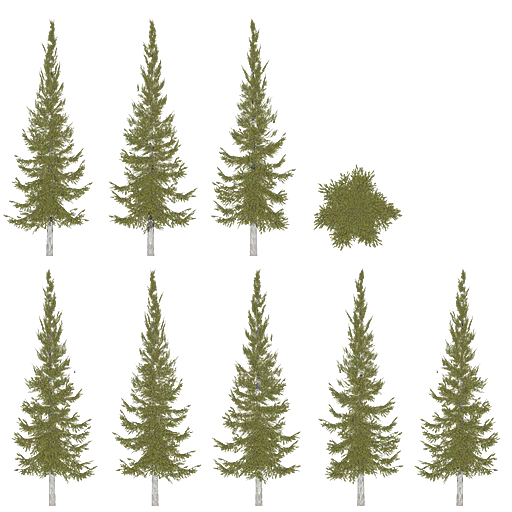
But many objects that have an “atlas” texture are not transparent, for example posters displayed on the walls are regrouped in such a texture. To exclude them, I created a list containing every non-transparent “atlas” texture :
=
This way, in the algorithm, we can assume : “an atlas texture is transparent, except if it’s in the ATLAS_EXCEPTIONS list”.
Finding the glossy texture
This algorithm is stupid because of the absolutely chaotic file naming scheme. I made a list of possible naming conventions :
=
For example, an ammo box could have textures named :
- ammo_box_d.png, ammo_box_g.png, ammo_box_n.png
- ammo_box_DIF.png, ammo_box_GLOS.png, ammo_box_NRM.png
- ammo_box_albedo.png, ammo_box_gloss.png, ammo_box_normal.png
- etc.
But sometimes you can have : ammo_box_DIF.png, ammo_box_gloss.png, ammo_box_n.png !
This algorithm starts with the assumption that the material follows such a naming convention. But very often, the glossy texture does exist but does not follow this convention, which means you have to search all possibilities before dismissing it as a non-glossy material. This makes this algorithm slow, but I wanted it to be exhaustive.
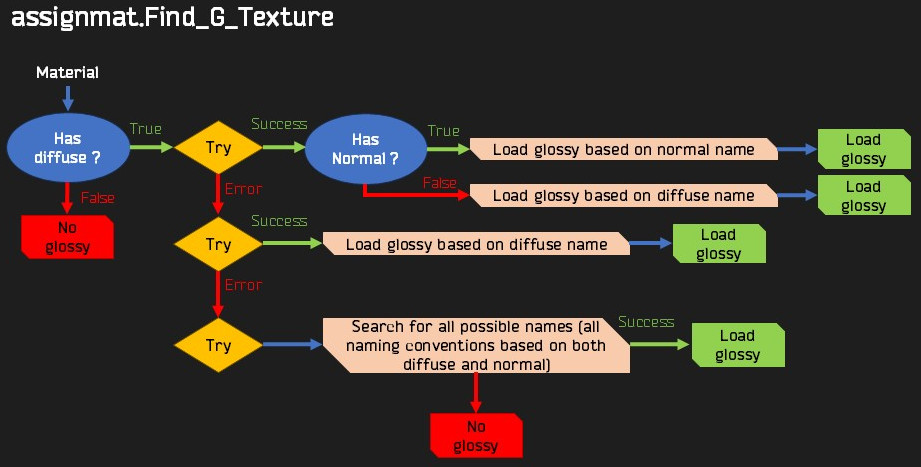
Another problem is materials that can share textures. For example, the Skier scene contains containers of different colors that have different diffuse textures, but they all share glossy and normal textures.
Building the material
The last step is building the material. I will not detail here the functions that determine if the material is emissive or a puddle, it’s basically searching for keywords in the texture name, just like for the transparency.
This algorithm has to take into account different situations depending on which textures exist for the material.