Making light beams from meshes and curves
2 minutes read
In the previous section, we used light sources to create beams of light thanks to path tracing render engines. But this method causes slow renders and can create a lot of unexpected behaviours (see the Blenderartists discussion).
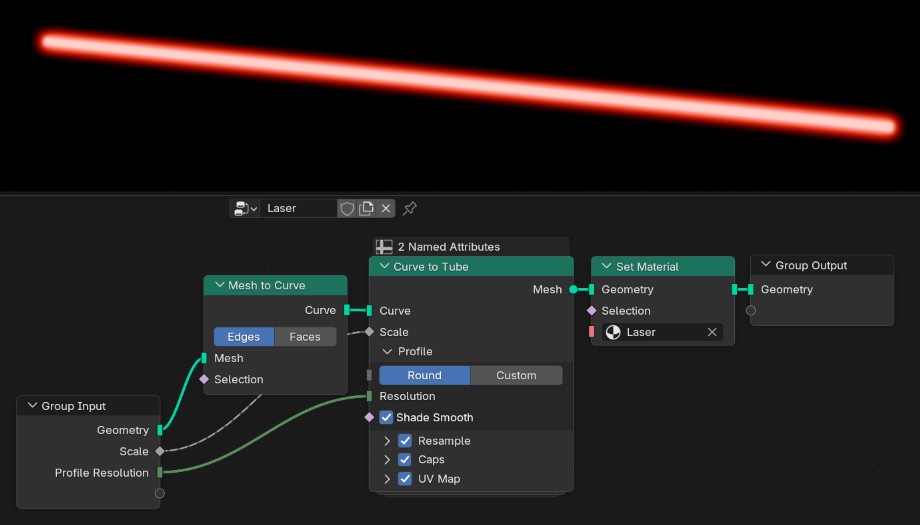
The simplest way to make a laser with geometry is to make an cylinder with an emissive material and adding a bloom post-processing effect. With modifiers or geometry nodes, it is even possible to convert edges or curves to cylinders thanks to the curve to tube modifier.
Here is an example with a straight mesh edge converted to a cylinder with the following geometry nodes setup (if you start from a curve, the Mesh to Curve node is unnecessary) :
Here are the bloom parameters :
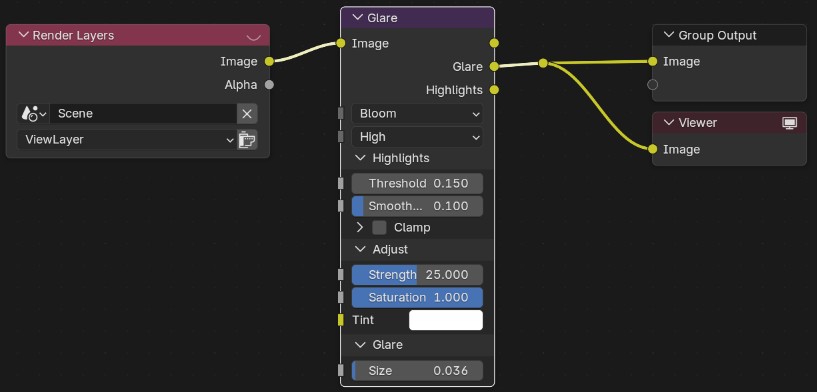
The choice of these parameters will depend on the beam diameter. Keep in mind that bloom is not an intrinsinc property of the laser, but it is always added because that’s how cameras and sensors behave in real life, when exposed to particularly strong light sources.
Also, in real conditions you would not see the laser beam unless the laser is extremely powerful or the ambiant air is extremely dusty. (in either case, you should worry)
This method is not “realistic” but is much faster, as it can work with EEVEE. See Jimtopher’s tutorial fore more ways to improve the laser material.